- Plugin
- Free
A free Google Shopping feed for nopCommerce
Put your products in Google Shopping, free listings and Shopping ads. Merchant Center Feed for Google builds your product feed, keeps it up to date and tells you, product by product, what Google would reject and how to fix it. Connect Google’s Merchant API and changes reach Google within minutes.
- nopCommerce
- 4.80, 4.90, 5.00
- Sync
- 5 minutes
- Price
- Free
- Licence
- Apache 2.0
Promotions → Google Merchant Center
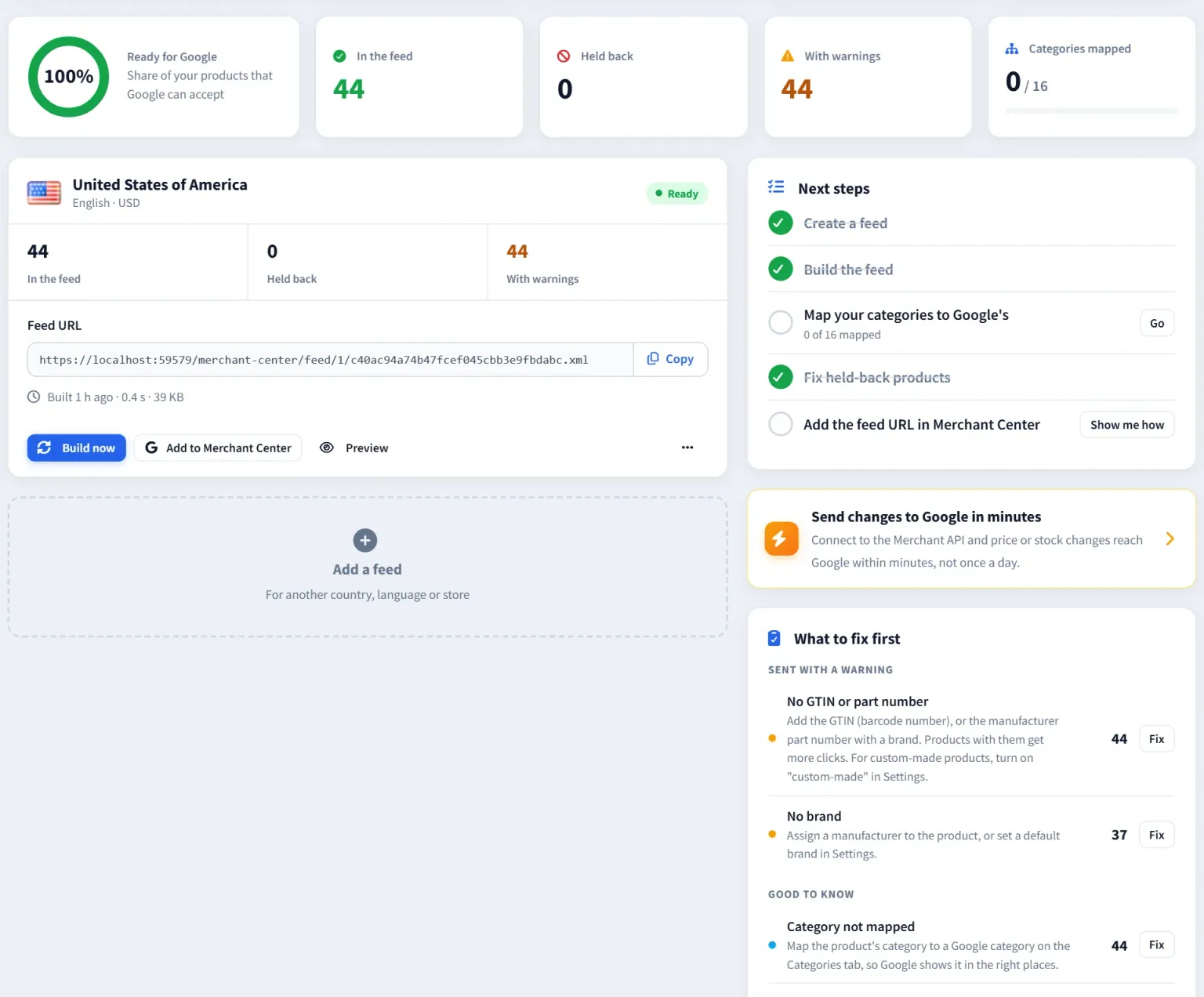
What it does
Every product checked before Google sees it.
Most Merchant Center problems start in the catalog: no picture, no brand, no GTIN, the wrong category. The plugin finds them in nopCommerce, where you fix them, instead of after Google rejects the product.
One-click setup
The first feed is created with your store, country, language and currency, and built straight away. A guide shows where its link goes in Merchant Center.
Checks before Google sees it
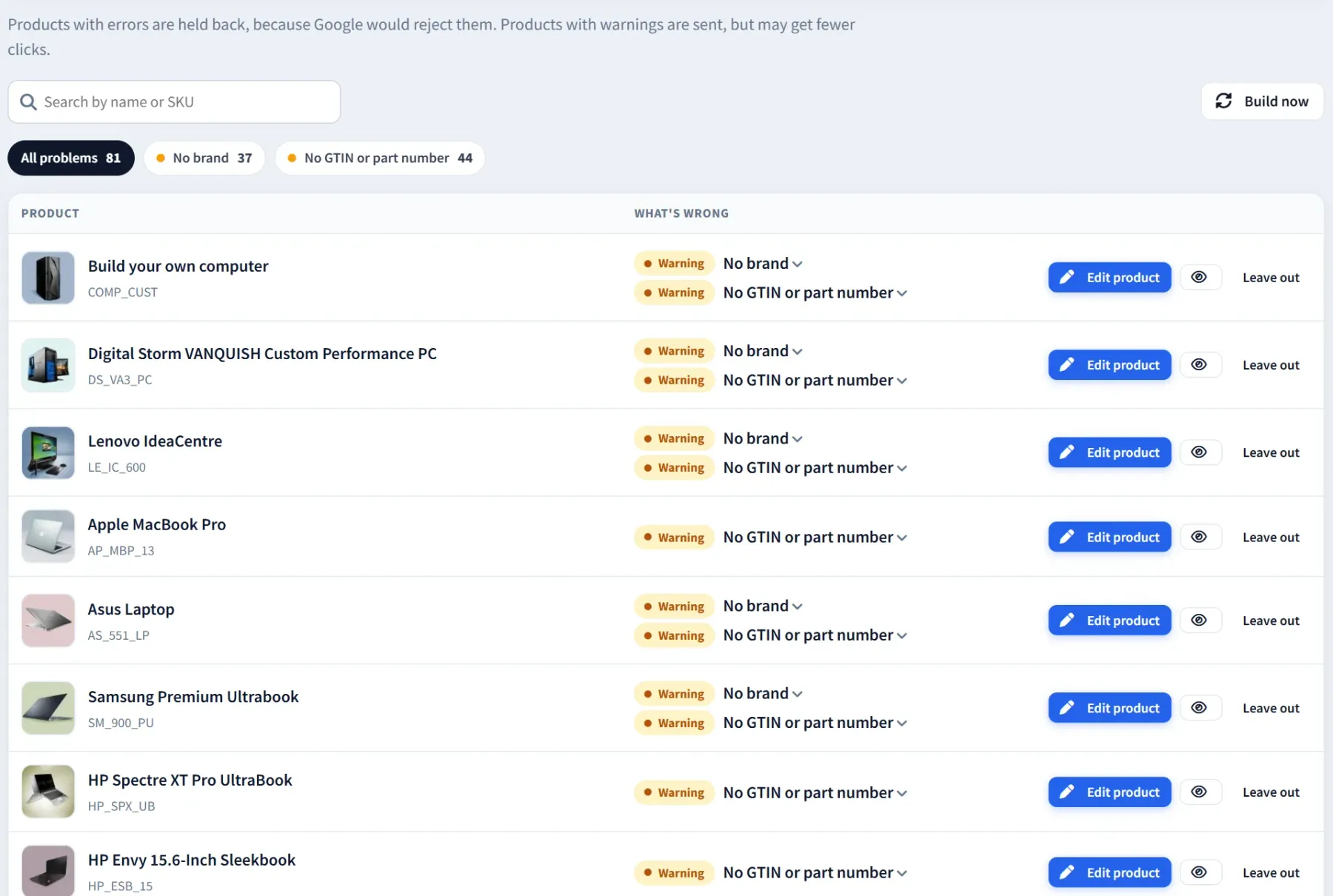
Products Google would reject are held back with the reason and the fix. Warnings cover missing brands, GTINs and part numbers, invalid GTIN check digits and long names.
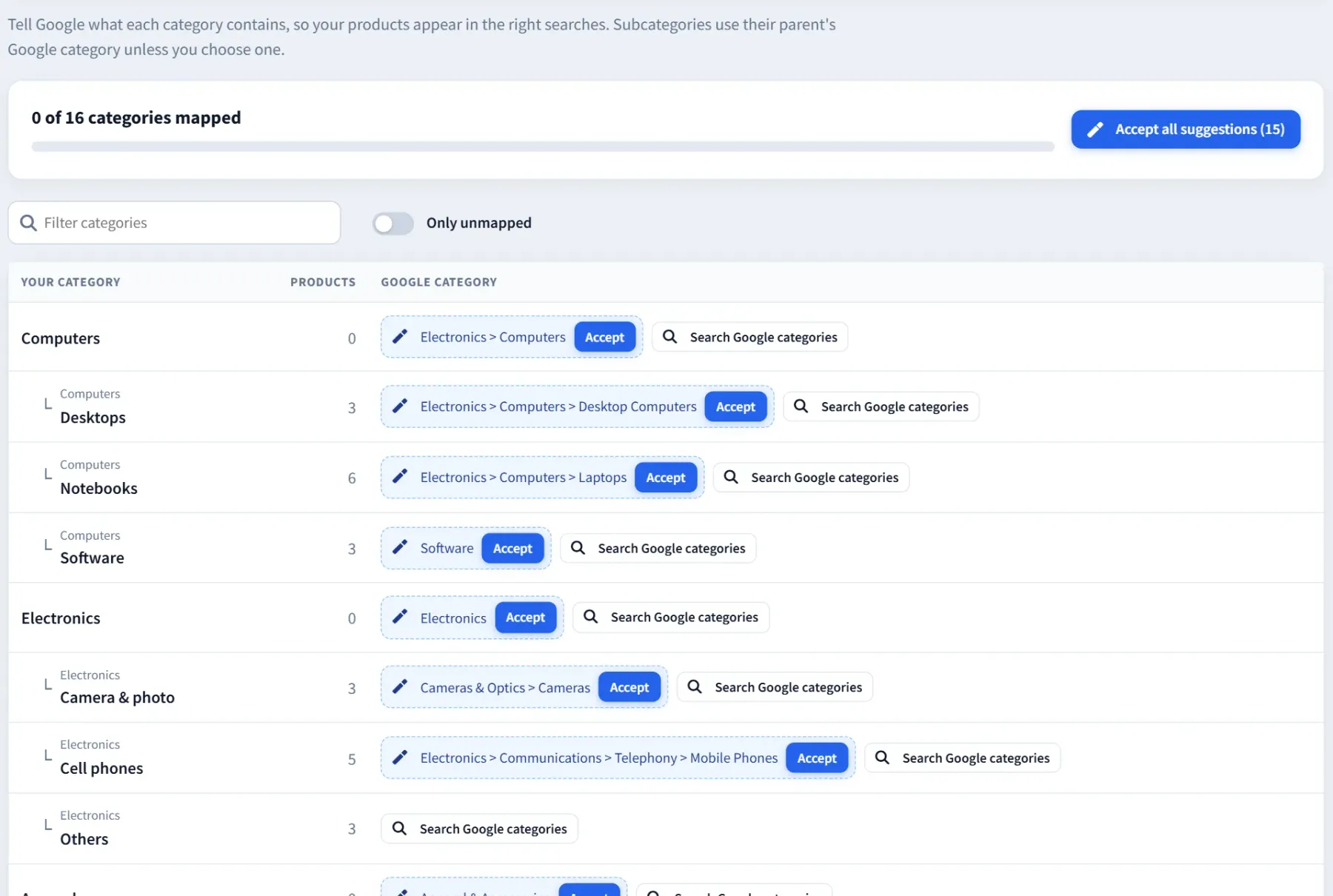
Category mapping
Each store category gets a suggested Google product category from Google’s own list. Accept them one by one or all at once; subcategories follow their parent.
Variants
Each attribute combination can go as its own product, with its own price, stock, GTIN and picture, grouped under the product.
Prices as shoppers see them
Old prices and discounts become Google’s sale price with the discount’s dates, converted to the feed’s currency, with or without tax as the country expects.
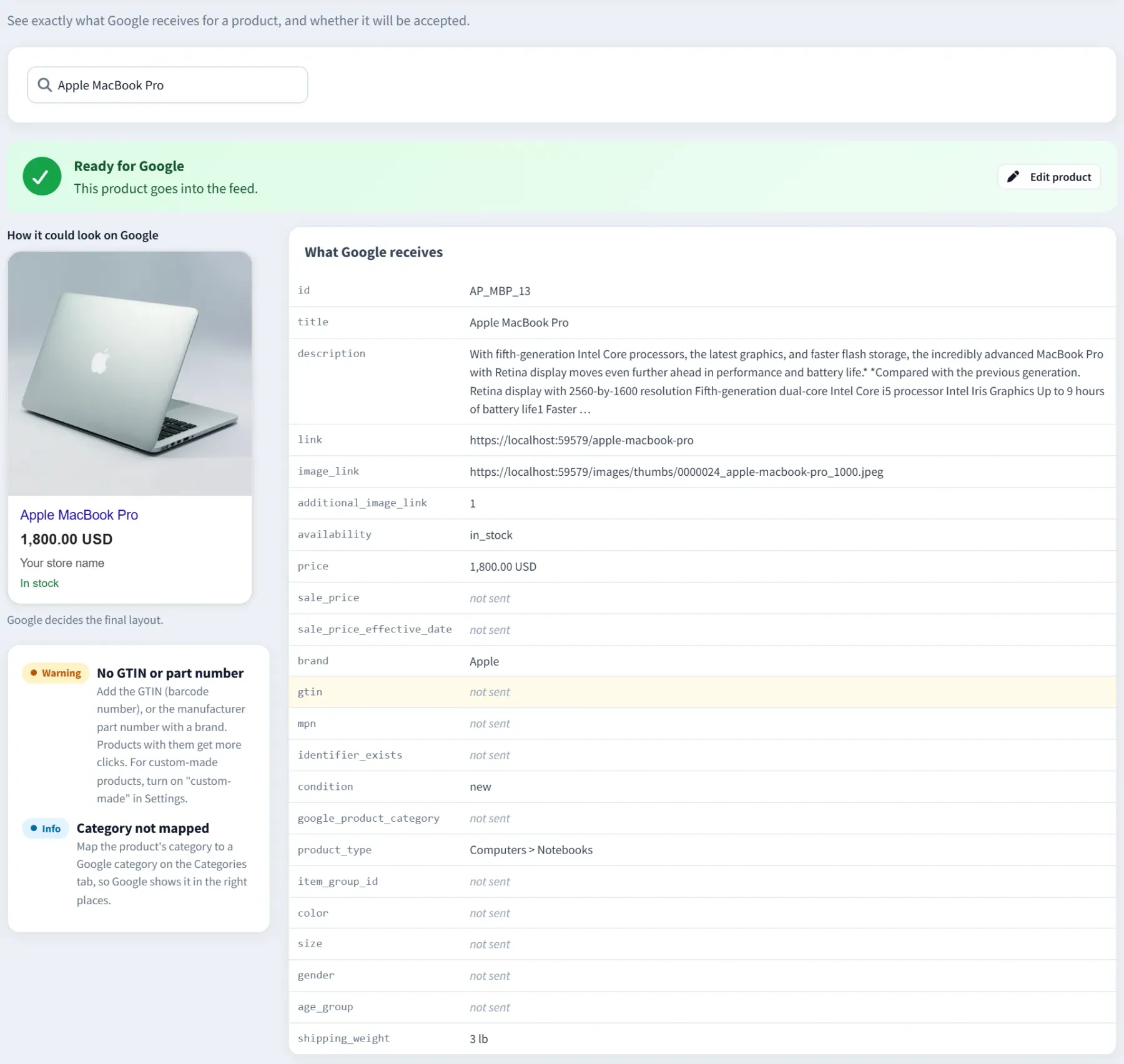
Preview any product
See exactly what Google receives: a mock of the listing, every attribute and the XML.
Sync in minutes
Optional: connect Google’s Merchant API and new products, prices, stock and removals reach Google within 5 minutes, instead of once a day.
Products in Google
See which products Google approved, limited or refused, with Google’s own explanation and a link to the fix, and the status on each product’s edit page.
Google Merchant Center → Products to fix
Google Merchant Center → Preview
Google Merchant Center → Categories
Set up a feed in four steps
- 1 Install the plugin and open Promotions → Google Merchant Center.
- 2 Click “Create and build my feed”.
- 3 In Merchant Center, add the feed link as a product source: Settings → Data sources → Add product source → Add products from a file → Enter a link to your file.
- 4 Map your categories, fix what’s held back and build again. Google fetches the feed every day, and the plugin rebuilds it every 6 hours.
Several feeds are possible: one per country, language, currency or store, each filtered by category, stock or price.
Optional: sync through the Merchant API
About 10 minutes, once. Each step on the page checks itself before you move on.
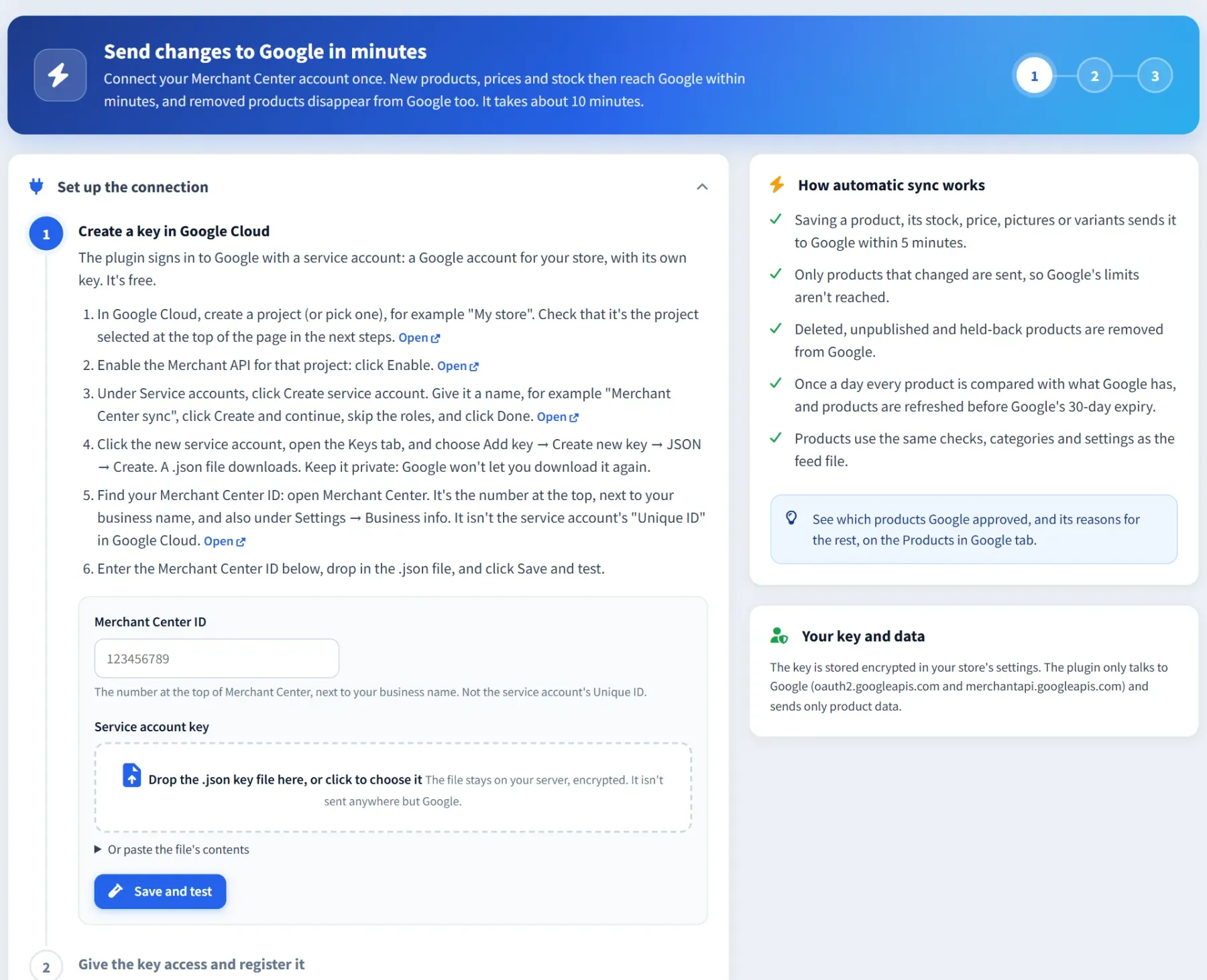
- 1 In Google Cloud, enable the Merchant API, create a service account with a JSON key, and drop the key on the Google connection page with your Merchant Center ID. “Save and test” checks it with Google.
- 2 In Merchant Center, add the service account’s email under People and access, then click Register. Google needs this once per Google Cloud project.
- 3 Click Connect. The plugin creates its own data source, “nopCommerce (Cartenvo)”, and sends only the products that changed.
The sync uses Merchant API v1, the successor to the Content API for Shopping that Google is shutting down. What the Content API shutdown means.
Google Merchant Center → Google connection
Safe for large and live stores
- With feed files, the plugin sends nothing anywhere: Google fetches the feed from your store through a private link.
- With automatic sync, product data goes only to Google, and the service account key is stored encrypted.
- Built for large catalogs: a 100,043-product PostgreSQL store’s whole feed was built in about 3 minutes.
- Product IDs can match your old plugin (SKU, product ID, or SKU with the ID as a fallback), so products keep their history in Google.
- Feeds are stored in App_Data, outside the web root. “New URL” replaces the link’s secret token.
Free, and Pro when you need it
Everything on this page is free, with no limits. Stores that run Google Ads can add Merchant Center Pro:
- Google Ads custom labels filled from margin, price, best sellers and stock
- Product titles built from templates
- Clicks, impressions and Google’s price benchmark per product
- Catalogs for Facebook, Instagram and Microsoft Shopping
Guides
Get your products approved
Practical guides to what Google checks, useful with or without the plugin.
GTIN, MPN and brand
What Google needs for each product, and what to send when there’s no barcode.
Google product category
How Google’s category list works and how to map a whole store to it.
Merchant API
Google shut down the Content API for Shopping. What that means for your feed.
nopCommerce feed setup
Which nopCommerce field feeds each Google attribute, and fixes for common disapprovals.
Frequently asked questions
Is the plugin really free?
Yes. The plugin, automatic sync and the Products in Google report are free, with no limits on products, feeds or stores. Merchant Center Pro is an optional paid add-on for Google Ads custom labels, title rules, performance reports and catalogs for Facebook, Instagram and Microsoft.
Does nopCommerce have a Google Shopping feed built in?
No. nopCommerce 4.80, 4.90 and 5.00 don’t include a Google Shopping feed. 5.00 adds a ChatGPT shopping feed plugin, which is a different thing. This plugin fills that gap for all three versions.
Do I need the Merchant API connection?
No. A feed file works on its own: Merchant Center fetches it every day. Connect the Merchant API when you want price and stock changes to reach Google within minutes, or to see product status from Google inside nopCommerce.
Is it affected by the Content API shutdown?
No. Google’s Content API for Shopping reached its sunset on 18 August 2026. The plugin’s automatic sync uses its successor, Merchant API v1, and feed files don’t use either API.
Which nopCommerce versions are supported?
nopCommerce 4.80 and 4.90 on .NET 9, and 5.00 on .NET 10. One package holds all three builds, and nopCommerce installs the one for its version.
Can I switch from another Google Shopping plugin?
Yes. Choose the same product ID format your old plugin used (SKU, product ID, or SKU with the ID as a fallback) so Google keeps each product’s history, then replace the old feed link in Merchant Center.
Products stuck in Merchant Center?
Cartenvo builds and maintains nopCommerce stores. Tell us what Merchant Center reports and we will tell you what it takes to fix it.